
Here’s what you need to make this work:
- A GitHub account
- The GitHub Desktop app
- A workflow set based on this repo
Create a repo for your static site.
Create an action/workflow in that repo. Put this in the main.yml file of that workflow:
on: push
name: 🚀 Deploy website on push
jobs:
  web-deploy:
    name: 🎉 Deploy
    runs-on: ubuntu-latest
    steps:
    - name: 🚚 Get latest code
      uses: actions/checkout@v4

    - name: 📂 Sync files
      uses: SamKirkland/FTP-Deploy-Action@v4.3.5
      with:
        server: ftp.yourdomain.com
        username: ${{ secrets.MYFTPUSERNAME }}
        password: ${{ secrets.MYFTPPASSWORD }}
server-dir: if/not/in/the/root/dirSave it.
Create “Secrets” to store your FTP login and password. Go to your repo and then to:
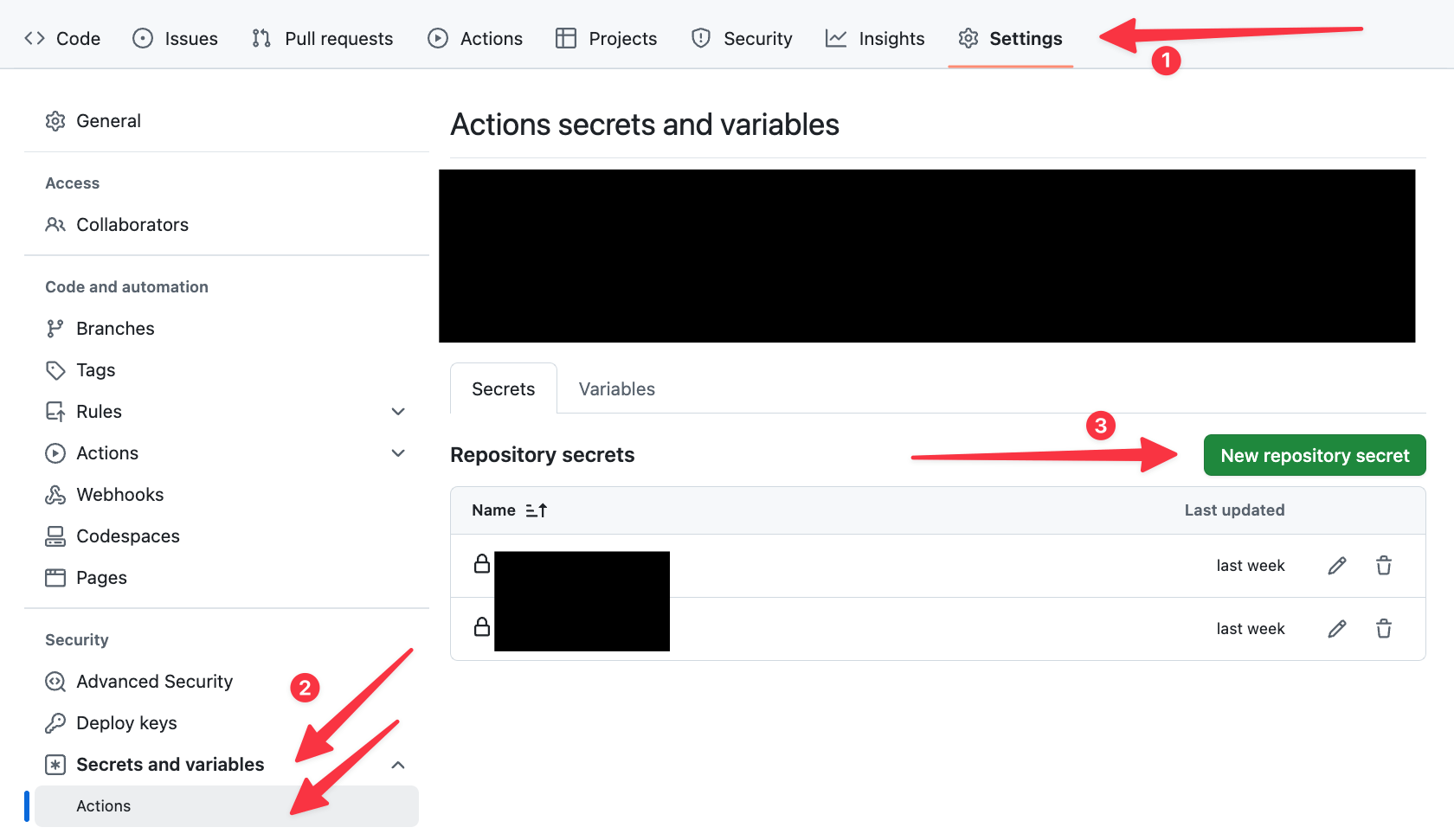
Save everything.
Now every time you update the repo, this automation will roll out the latest changes straight to your web host.
Note: if the initial deploy fails, create an empty .ftp-deploy-sync-state.json file in the repo and try again. Can delete afterwards.